10.4. Diode calibration
Download this page as a Jupyter notebook
When calibrating, it is important to take into account the characteristics of the sensor used to measure the data.
Depending on the sensor in your system, and whether it was pre-calibrated you may need to consider a few extra steps in the calibration procedure. We will illustrate this on a small dataset:
lk.download_from_doi("10.5281/zenodo.7729823", "test_data")
f = lk.File("test_data/noise_floor.h5")
Let’s grab a calibration item from the file and check whether it was a full calibration by checking its kind property.
If this returns "Active" or "Passive", it means that it was a full calibration, meaning it will have information about the diode in the calibration item:
>>> calibration_item = f.force1x.calibration[0]
... calibration_item.kind
'Passive'
If the last item was a full calibration, we can check whether this system has a calibrated diode by checking the fitted_diode property:
>>> calibration_item.fitted_diode
False
In this case the property is False, which means the diode was not fitted during the calibration.
In other words, a pre-calibrated diode was used.
We can extract the diode calibration model as follows:
>>> diode_calibration = calibration_item.diode_calibration
... diode_calibration
DiodeCalibrationModel()
This model describes the relation between trap power and the sensor parameters. To use this model, call it with total trap power to determine the diode parameters at that power level.
>>> diode_params = diode_calibration(f["Diagnostics"]["Trap power 1"])
... diode_params
{'fixed_diode': 14829.480905511606, 'fixed_alpha': 0.4489251910346808}
These parameter values can be used directly with calibrate_force().
A convenient way to do this is to grab the calibration parameters of a previous calibration, and only update the diode calibration parameters.
Below is an example of how to do this with a dict union using the | operator:
>>> params = calibration_item.calibration_params()
... # replace the 'fixed_diode' and 'fixed_alpha' values in params
... # with the corresponding values from diode_params and return a new dict
... updated_params = params | diode_params
... print(updated_params)
{'num_points_per_block': 200,
 'sample_rate': 100000,
 'excluded_ranges': [],
 'fit_range': (10.0, 23000.0),
 'bead_diameter': 4.34,
 'rho_bead': 1060.0,
 'rho_sample': 997.0,
 'viscosity': 0.000941,
 'temperature': 22.58,
 'fixed_alpha': 0.4489251910346808,
 'fixed_diode': 14829.480905511606,
 'fast_sensor': False,
 'axial': False,
 'hydrodynamically_correct': True,
 'active_calibration': False}
We can see that this updated the fixed diode parameters.
Note
Each sensor has its own diode characteristic. If you are calibrating multiple traps with pre-calibrated diodes, you will need to provide the correct diode parameters for each trap.
We can calibrate with these parameters directly by unpacking this dictionary into the calibrate_force() function:
volts = f.force1x / f.force1x.calibration[0].force_sensitivity

calibration = lk.calibrate_force(volts.data, **updated_params)
calibration.plot()
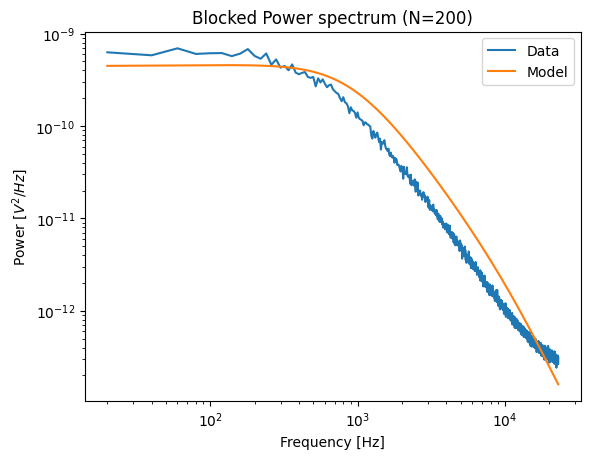
Unfortunately, in this case, we also have a noise floor to contend with, so we should restrict the fitting range as well (for more information about this, see the section on noise floors). In this case, we restrict the upper bound of the fitting range to approximately four times the corner frequency:
volts = f.force1x / f.force1x.calibration[0].force_sensitivity

updated_params = updated_params | {"fit_range": [100, 2300]}
calibration = lk.calibrate_force(volts.data, **updated_params)
calibration.plot()
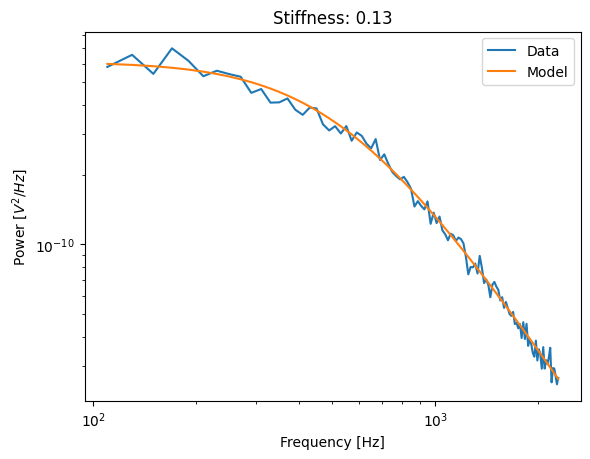
To judge whether the noise floor has been sufficiently truncated, you can play with the upper limit of the fit range and see if the corner frequency no longer changes.
10.4.1. When to use calibrated diode parameters
Using a calibrated diode is critical when the corner frequency is close to or higher than the diode frequency. When the corner frequency is very high, the estimation of the model parameters can fail despite the fit looking good.
In this data, the corner frequency is low, therefore using the diode parameters is not strictly necessary:
>>> calibration.corner_frequency
531.0129872280306
Removing fixed_diode and fixed_alpha from the calibration arguments (by setting them to None) results in almost no change in this case:
updated_params = updated_params | {"fixed_alpha": None, "fixed_diode": None, "fit_range": [100, 2300]}
calibration = lk.calibrate_force(volts.data, **updated_params)
calibration.plot()
plt.title(f"Stiffness: {calibration.stiffness:.2f}");
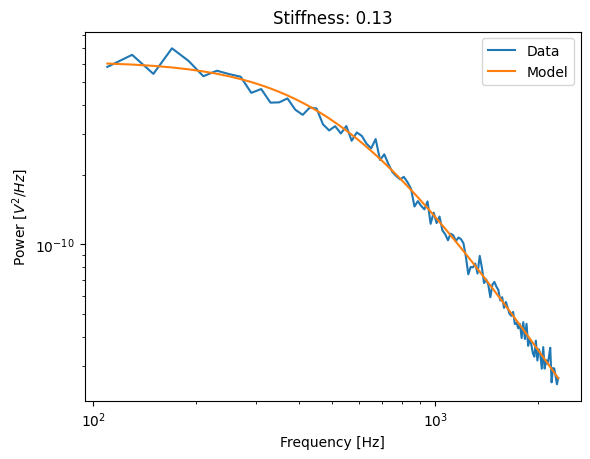
As we can see, the stiffness is pretty much the same in this case.